

Here’s an uncomfortable truth: if you’re only scanning container images, you’re missing a key aspect of your security vulnerabilities. While container scanning is valuable for checking packaged dependencies and OS components which in itself cannot be understated, it’s not necessarily aware of the custom code vulnerabilities that attackers exploit in real-world breaches.
Think of it this way—container scanning checks whether your ingredients are fresh, but it can’t tell if your recipe is poisoned. And in today’s threat landscape, attackers are poisoning the recipe.
What Container Scanning Can’t See
Container scanners analyze built images after compilation—comparing package versions against CVE databases. They’re excellent at finding known vulnerabilities in third-party components. But, it’s not intrinsically geared towards detecting the vulnerabilities in your code.
Once your application code has been compiled into binaries, the scanner has little to no visibility into how that code actually works. It can’t analyze logic flows, trace data paths, or understand business rules.
What does this mean in practice? Container scanners are not designed to surface:
- Broken authentication mechanisms that let attackers bypass login
- Business logic flaws that allow transaction manipulation
- Authorization weaknesses enabling privilege escalation
These represent several of the OWASP Top 10 vulnerability categories which necessitate the need for organizations to also adopt source code scanning as part of their overall security posture.
Real Breaches That Prove the Point
Some of the most well known security incidents of recent years all share something in common: they succeeded because organizations relied on container scanning solely instead of a holistic approach which also incorporated source code scanning.
SolarWinds (2020) remains the textbook case. Russian state-sponsored attackers deployed malware on SolarWinds build servers that surgically modified source code during compilation. The malicious code was compiled, signed with valid certificates, and distributed to 18,000+ organizations including multiple U.S. federal agencies.
CodeCov (2021) demonstrates supply chain risk at the source level. Attackers modified the Bash uploader script that thousands of developers ran in their CI/CD pipelines, silently exfiltrating environment variables, API keys, and credentials for over two months. Organizations including HashiCorp and hundreds of others were compromised.
Log4Shell (2021) affected hundreds of millions of devices with a critical severity rating. The vulnerability was a missing input validation check in Apache Log4j source code that existed for eight years before discovery. Static analysis tools are specifically designed to catch input validation failures—but you have to scan the source code, not just containers.
The Timing Problem
Container scanning happens after code is compiled. By the time you scan a container image, package installation scripts have already been executed with full developer privileges—potentially accessing secrets, modifying files, or establishing persistence.
Modern package managers (npm, pip, Maven) automatically run code during installation. These scripts execute before build time, before containerization, before any scanner examines the result. If a malicious package or compromised dependency runs code during installation, container scanning only may not see it.
This is why supply chain attacks increasingly target upstream dependencies. Over 512,000 malicious packages were identified in 2024—a 156% year-over-year increase. These attacks exploit the blind spot between source code and containers.
The Solution: Dual-Layer Security
Stop treating source code scanning and container scanning as alternatives. They’re complementary layers that catch different problems at different stages. You need both.
This is exactly the approach Anchore has built: scan early at the source code level, then scan again when you build containers. It’s not redundant—it’s smart defense that covers both angles.
What Anchore’s Container Scanning Catches
Anchore’s container scanning goes deep. Using three core tools—Syft for building a software bill of materials (SBOM – a formal inventory of all the components, libraries, and dependencies that make up a piece of software), Grype for finding vulnerabilities, and Anchore Enterprise for managing it all—the platform examines every layer of your container images.
This means more than just checking package versions. The scanner looks at operating system packages, application dependencies, nested archives (like JARs inside WARs), and even scans file contents for exposed secrets, and malware signatures.
The vulnerability database draws from over 15 authoritative sources including the National Vulnerability Database, GitHub Security Advisories, and vendor-specific security data. But, Anchore doesn’t just dump a list of CVEs at you. It prioritizes risks using CVSS severity scores, EPSS (which predicts exploitation likelihood), and CISA’s list of actively exploited vulnerabilities.
What really matters: you get focused on what’s actually dangerous, not just what’s technically vulnerable.
What Anchore’s Source Code Scanning Catches
Here’s where Anchore differs from traditional static analysis tools. Instead of analyzing your custom application code for logic flaws, Anchore focuses on Software Composition Analysis (SCA)—identifying vulnerabilities in the open source dependencies you’re pulling into your projects.
The scanner reads your package manifest files (package.json, requirements.txt, pom.xml, go.mod—you name it) and checks both direct and transitive dependencies without needing to compile anything. It supports over 40 programming language ecosystems from C++ and Java to Rust and Swift.
The secrets detection capability scans both source repositories and built containers for exposed credentials: AWS keys, database passwords, API tokens, SSH keys. When it finds them, you can automatically block builds or deployments.
The key limitation: Anchore won’t catch SQL injection, cross-site scripting, or business logic flaws in your custom code. For that, you still need traditional SAST tools. Anchore’s documentation explicitly says to use both.
Why Both Layers Matter
The reality is that containers bring in way more than your application code. Base images, system libraries, runtime environments—all of these can introduce vulnerabilities that don’t exist in your source code.
At the source level, you catch vulnerable dependencies early when they’re cheap to fix. But, you’ll miss OS-level vulnerabilities, runtime environment risks, and problems introduced during the build process itself.
At the container level, you see the complete picture of what’s actually deploying to Production—but by then, you’ve already spent time and resources building the image. Finding problems at this stage costs more to fix.
Real examples make this concrete:
Container scanning catches:
- Critical vulnerabilities in Alpine’s package manager or OpenSSL libraries
- Log4j vulnerabilities buried deep in nested JAR dependencies
- Malware injected through compromised base images
Source code scanning catches:
- Vulnerable npm packages declared in package.json before they’re even installed
- Exposed secrets in configuration files before they reach version control
- Problematic open source licenses that could create legal issues
The two approaches complement each other and a real-world use case would be scanning a source code repository for open source licensure compliance or vulnerabilities in open source dependencies in the source code check-in stage of the build pipeline prior to an artifact (JAR, WAR, container image, etc.) being built, tested (unit, integration, automation, etc.), stored (within an artifact repository/container registry), and ultimately deployed.
One approach doesn’t also have to be done at the expense of the other as they are interchangeable with no co-dependencies. For instance, if an organization was already leveraging a traditional SAST tool for source code scanning, Anchore could then solely be utilized for container scanning within the build pipeline.

How It Works
Anchore integrates with the tools you’re already using. GitHub Actions, GitLab CI/CD, Jenkins, Azure DevOps, CircleCI—there are native integrations for all of them.
You can run source code scanning in distributed mode as described below which will work with any CI/CD system as long as the AnchoreCTL binary can be installed and run, or you can access the Enterprise APIs directly .
- Distributed mode: Generate SBOMs locally and send them to Anchore for analysis
AnchoreCTL is published as a simple binary available for download either from the Anchore Enterprise deployment or Anchore’s release site.
Using AnchoreCTL, you can manage and inspect all aspects of an Anchore Enterprise deployment, either as a manual control tool or as a CLI that is designed to be used in scripted environments such as CI/CD and other automation environments.
The platform’s policy engine lets you define security gates that automatically block non-compliant code/images from deploying. Pre-built policy bundles cover FedRAMP, NIST, DISA STIG, and other compliance frameworks, or you can write custom policies in JSON.
One unique capability: continuous monitoring through stored SBOMs. When a new zero-day vulnerability like Log4Shell emerges, you can instantly query your SBOM repository to find all affected systems—no rescanning required.
Example:
In the below example, we’ll generate an SBOM from a source code repository and then analyze (for vulnerabilities) and import the resultant SBOM into an Anchore Enterprise deployment as part of a versioned application source code artifact.
AnchoreCTL is also being leveraged in distributed mode which could be automated by adding the steps to a CI/CD pipeline script.
1) Add a name for the application into Anchore Enterprise which will be mapped to the source code repository.
user@system:~# anchorectl application add k8s-inventory

 ✔ Added application
Name: k8s-inventory
ID: 034b879d-5747-4deb-b29e-dc559d73fd03
Description:
Versions: 2) Add an application version that will be associated as a source code artifact.
user@system:~# anchorectl application version add [email protected]

 ✔ Added version
Version Name: v1.0.0
ID: 1186e645-7309-499b-8ca1-82f557710152
Application ID: 034b879d-5747-4deb-b29e-dc559d73fd03
Created At: 2025-11-04T15:15:28Z
Last Updated: 2025-11-04T15:15:28Z
3) Generate the SBOM from the source code repository, perform analysis, and import the resultant SBOM. The source code artifact association ([email protected]) is also being done during this step with the “–application” flag.
NOTE: The source code artifact comes into play with continuous integration to track the latest code changes for a given application version.
user@system:~# anchorectl syft scan --source-name k8s-inventory --source-version v1.0.0 -o json . | anchorectl source add github.com/anchore/k8s-inventory/[email protected] --application "[email protected]" --branch main --wait --from -

 ✔ Indexed file system
 ✔ Cataloged contents                                                                                               248991163569816cb202a8b2db755470b3c2c35e9e2027c694d3fa07d716e76e
   ├── ✔ Packages                        [428 packages]
   ├── ✔ Executables                     [2 executables]
   ├── ✔ File digests                    [2 files]
   └── ✔ File metadata                   [2 locations]
Source:
  status:          analyzed (active)
  uuid:            eeab0c4a-95c4-4d10-9b3c-e5b754693cdb
  source:          github.com/anchore/k8s-inventory/[email protected]
  vcs:             git
  branch:          main
4) Check to make sure the source code repository is known to Anchore Enterprise and analysis has occurred.
user@system:~# anchorectl source list

 ✔ Fetched sources
┌──────────────────────────────────────┬────────────┬──────────────────────────────┬──────────┬─────────────────┬───────────────┐
│ UUID                                 │ HOST       │ REPOSITORY                   │ REVISION │ ANALYSIS STATUS │ SOURCE STATUS │
├──────────────────────────────────────┼────────────┼──────────────────────────────┼──────────┼─────────────────┼───────────────┤
│ eeab0c4a-95c4-4d10-9b3c-e5b754693cdb │ github.com │ anchore/k8s-inventory/latest │ v1.0.0   │ analyzed        │ active        │
└──────────────────────────────────────┴────────────┴──────────────────────────────┴──────────┴─────────────────┴───────────────┘5) Check to make sure the source code artifact is known to Anchore Enterprise.
user@system:~# anchorectl application artifact list [email protected]

 ✔ List artifacts
┌─────────────────────────────────────────┬────────┬────────┐
│ DESCRIPTION                             │ TYPE   │ HASH   │
├─────────────────────────────────────────┼────────┼────────┤
│ github.com/anchore/k8s-inventory/latest │ source │ v1.0.0 │
└─────────────────────────────────────────┴────────┴────────┘
6) Although not a focal point for this post, the source code repository/artifact can also be verified via the Anchore Enterprise UI. Reference below documentation for further information on functionality via the UI.
NOTE: Work with Applications Generated from Source Repositories
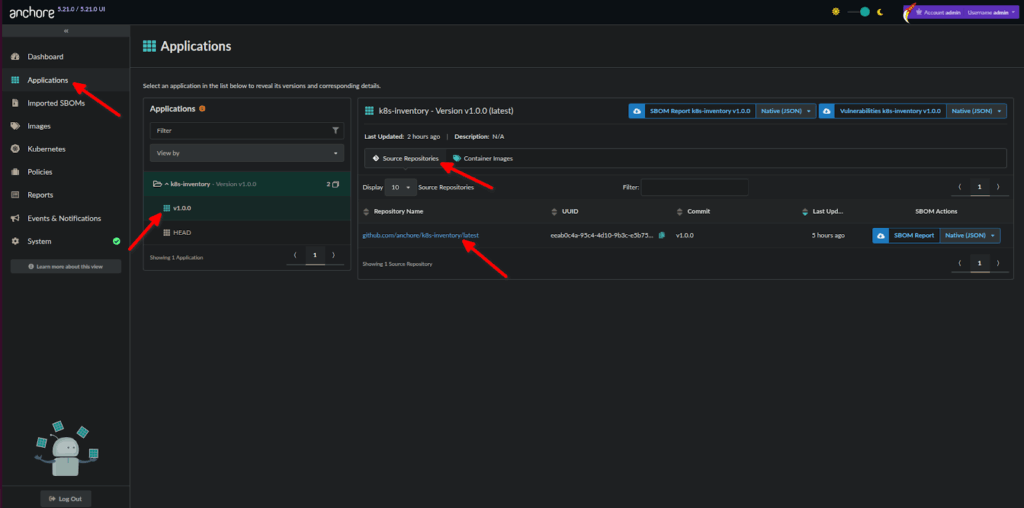
NOTE: The “UUID” from Step 3 or 4 would be needed as an argument for the below steps.
7) Gather the imported/source SBOM (if needed/required).
user@system:~# anchorectl source sbom eeab0c4a-95c4-4d10-9b3c-e5b754693cdb -f /tmp/sbom.json

✔ Fetched SBOM8) Gather the vulnerabilities from the analysis.
user@system:~# anchorectl source vulnerabilities eeab0c4a-95c4-4d10-9b3c-e5b754693cdb

 ✔ Fetched vulnerabilities                   [42 vulnerabilities]                                                                               eeab0c4a-95c4-4d10-9b3c-e5b754693cdb
┌─────────────────────┬──────────┬─────────────────────────────────────┬──────────┬───────────────────────────────┬──────────────┬──────┬────────────┬───────┬────────────────┬───────────────────────────────────────────────────┐
│ ID                  │ SEVERITY │ NAME                                │ VERSION  │ FIX                           │ WILL NOT FIX │ TYPE │ FEED GROUP │ KEV   │ CVES           │ URL                                               │
├─────────────────────┼──────────┼─────────────────────────────────────┼──────────┼───────────────────────────────┼──────────────┼──────┼────────────┼───────┼────────────────┼───────────────────────────────────────────────────┤
│ CVE-2025-58187      │ High     │ stdlib                              │ go1.24.2 │ 1.24.9,1.25.3                 │ false        │ go   │ nvd        │ false │ CVE-2025-58187 │ https://nvd.nist.gov/vuln/detail/CVE-2025-58187   │
│ GHSA-fv92-fjc5-jj9h │ Medium   │ github.com/go-viper/mapstructure/v2 │ v2.2.1   │ 2.3.0                         │ false        │ go   │ github:go  │ false │                │ https://github.com/advisories/GHSA-fv92-fjc5-jj9h │
│ CVE-2025-61723      │ High     │ stdlib                              │ go1.24.2 │ 1.24.8,1.25.2                 │ false        │ go   │ nvd        │ false │ CVE-2025-61723 │ https://nvd.nist.gov/vuln/detail/CVE-2025-61723   │
│ CVE-2025-47906      │ Medium   │ stdlib                              │ go1.24.3 │ 1.23.12,1.24.6                │ false        │ go   │ nvd        │ false │ CVE-2025-47906 │ https://nvd.nist.gov/vuln/detail/CVE-2025-47906   │
│ GHSA-vvgc-356p-c3xw │ Medium   │ golang.org/x/net                    │ v0.37.0  │ 0.38.0                        │ false        │ go   │ github:go  │ false │ CVE-2025-22872 │ https://github.com/advisories/GHSA-vvgc-356p-c3xw │
│ CVE-2025-58183      │ Medium   │ stdlib                              │ go1.24.3 │ 1.24.8,1.25.2                 │ false        │ go   │ nvd        │ false │ CVE-2025-58183 │ https://nvd.nist.gov/vuln/detail/CVE-2025-58183   │
│ CVE-2025-61725      │ High     │ stdlib                              │ go1.24.2 │ 1.24.8,1.25.2                 │ false        │ go   │ nvd        │ false │ CVE-2025-61725 │ https://nvd.nist.gov/vuln/detail/CVE-2025-61725   │
│ CVE-2025-58188 │ High │ stdlib │ go1.24.3 │ 1.24.8,1.25.2 │ false │ go │ nvd │ false │ CVE-2025-58188 │ https://nvd.nist.gov/vuln/detail/CVE-2025-58188 │9) Perform a policy evaluation.
user@system:~# anchorectl source check eeab0c4a-95c4-4d10-9b3c-e5b754693cdb

 ✔ Evaluated against policy                  [passed]                                                                                           eeab0c4a-95c4-4d10-9b3c-e5b754693cdb
Evaluation ID: f406016067fa4b7b529d519253cbed52
Source ID: eeab0c4a-95c4-4d10-9b3c-e5b754693cdb
Host: github.com
Repository: anchore/k8s-inventory/latest
Revision: v1.0.0
Policy ID: anchore_secure_default
Updated: 2025-11-04T15:44:22Z
Evaluation: warn
Number of Findings: 42That’s it…
The Bottom Line
Modern applications aren’t just your code. They’re a complex stack of dependencies, libraries, system packages, and runtime environments. Security at just one layer leaves gaps.
Anchore’s dual approach—SCA and secrets detection at the source level, comprehensive container scanning for built images—gives you visibility across the entire software supply chain. From a developer’s first commit to production runtime, you’re covered.
Organizations using this approach see 75-80% reductions in vulnerability management time and deploy 50-70% faster. More importantly, they ship secure software with confidence.
Container scanning protects against known vulnerabilities in dependencies. Source code scanning protects against the unknown vulnerabilities that attackers actually exploit. Source code scanning and container scanning aren’t competing strategies—they’re layers that work in tandem to provide the complete picture you need.